

Starlink vs T-Mobile Home Internet 2026: Which Is Better for Rural Areas?
Disclosure: GetRemoteInternet is reader-supported. This article contains affiliate links, and we may earn a commission if you purchase through them — at no extra cost to you. Learn more.
Two of the biggest names in rural internet are Starlink and T-Mobile Home Internet — and they’re both genuinely good options in 2026. But they work very differently, cost different amounts, and perform better in different situations. This guide breaks down the real-world differences so you can choose the right one for your property.
Starlink vs T-Mobile Home Internet: Quick Comparison
| Starlink Standard | T-Mobile Home Internet | |
|---|---|---|
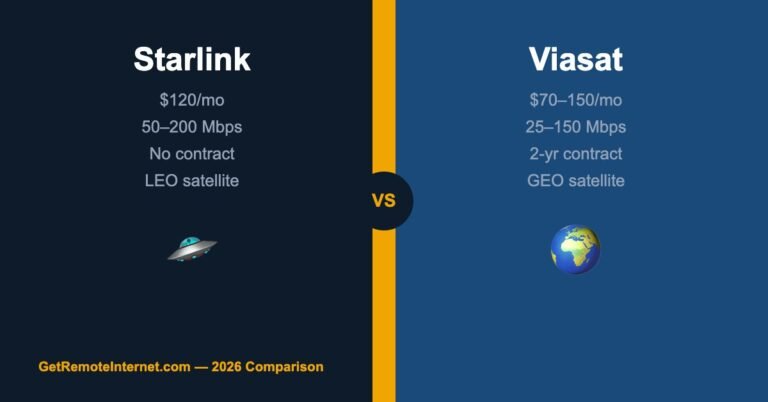
| Monthly Price | $120/mo | $50–$60/mo |
| Hardware Cost | $599 one-time | $0 (included) |
| Download Speed | 25–220 Mbps | 33–182 Mbps |
| Upload Speed | 5–20 Mbps | 6–23 Mbps |
| Latency | 25–60 ms | 30–50 ms |
| Data Cap | None (Standard) | None |
| Availability | Nationwide (most of U.S.) | T-Mobile coverage areas only |
| Contract | No contract | No contract |
| Best For | Remote areas with no cell coverage | Rural areas with T-Mobile signal |
Pricing: T-Mobile Home Internet Wins Easily
T-Mobile Home Internet is significantly cheaper — $50–60/month with no hardware cost versus Starlink’s $120/month plus a $599 dish. If you use both for 24 months, T-Mobile costs $1,200–1,440 total while Starlink costs $3,479 over the same period.
T-Mobile’s price advantage is hard to ignore. The main question is: do you have T-Mobile coverage at your home?
Speed: Closer Than You’d Think
Both services deliver speeds that handle streaming, video calls, and remote work comfortably. In good conditions, Starlink edges ahead — especially in areas where T-Mobile’s network is congested. But in areas with strong T-Mobile signal and low congestion (common in rural areas), speeds are comparable.
Real-world testing shows Starlink averages 50–100 Mbps download in most rural areas, while T-Mobile Home Internet averages 40–80 Mbps. Both are more than enough for Netflix 4K (which only needs 25 Mbps) and Zoom calls (under 5 Mbps).
Latency: Both Are Usable for Video Calls, Gaming Is Different
Starlink has come a long way from the early days of 300+ ms latency. Current Gen 2 Starlink averages 25–60 ms — perfectly usable for video calls, VoIP, and most online gaming. T-Mobile Home Internet typically runs 30–50 ms.
For competitive online gaming, T-Mobile Home Internet has a slight edge due to more consistent low latency. For everything else, the difference is negligible.
Availability: Starlink Reaches Where T-Mobile Can’t
This is where Starlink shines — and why many rural residents don’t have a choice. T-Mobile Home Internet requires adequate T-Mobile 4G/5G coverage at your home address. In many rural areas — especially in the Mountain West, Great Plains, and remote agricultural regions — T-Mobile coverage is sparse or nonexistent.
Starlink works essentially anywhere with a clear view of the sky. If you’re in a hollow, surrounded by tall trees, or at the bottom of a valley, you may have obstruction issues — but for most rural properties, Starlink reaches where nothing else does.
Check T-Mobile availability first at t-mobile.com/isp. If your address shows as eligible, T-Mobile Home Internet is almost certainly the better financial decision.
Reliability: Weather and Conditions Matter
Starlink is affected by heavy rain, snow accumulation on the dish, and obstructions (trees, buildings). The dish has a built-in heater for snow melting, but during severe weather, you may see brief outages. T-Mobile Home Internet, being cellular, can be affected by network congestion during peak hours.
In most real-world scenarios, both services have similar uptime — around 99%+ when properly installed. Neither is perfect, but both are dramatically better than the rural DSL or satellite (HughesNet/Viasat) options they’re replacing.
Installation: T-Mobile Is Simpler
T-Mobile Home Internet arrives as a simple gateway (router/modem combo) that you plug in. That’s it. No roof mounting, no pointing at satellites, no coax cables. Setup takes about 15 minutes.
Starlink requires mounting the dish (Dishy) with a clear view of the sky, running a cable into your home, and setting up the router. It’s not complicated, but it’s a bigger project — especially if you want the dish on your roof for the best line-of-sight.
Who Should Choose Starlink?
- You’re in a truly remote area with weak or no T-Mobile coverage
- You need consistent performance regardless of local network congestion
- You work from home and need reliable upload speeds for video calls
- You’re willing to pay more for the best available option in your area
- You have a large property and want whole-home WiFi coverage (Starlink’s router is excellent)
Who Should Choose T-Mobile Home Internet?
- T-Mobile shows your address as eligible — start here, it’s the easiest way to decide
- Budget is a priority — $50–60/month vs. $120/month is a meaningful difference
- You want simple setup with no hardware to maintain or mount
- You already have T-Mobile cell service and it’s reliable at your home
- You want to bundle with existing T-Mobile mobile plans for potential discounts
Can You Use Both? (The Backup Strategy)
Some rural homeowners use T-Mobile Home Internet as their primary connection and Starlink as a failover — or vice versa. With a dual-WAN router, you can automatically switch between connections when one goes down. This setup costs more but gives you near-100% uptime reliability, which matters if you work from home or run a home business.
Ready to decide? Both plans have no annual contracts — try one and switch if needed.
Which One I’d Put in My Own House
Being honest about my own place: I’d try T-Mobile first and keep Starlink as the upgrade. The logic is simple — T-Mobile is $50 vs Starlink’s $120, with no $599 hardware and no contract either way. If T-Mobile gives me solid bars and 100+ Mbps, I’ve saved $70/month and $599 for performance I genuinely can’t tell apart during normal use. The only reason to jump straight to Starlink is a weak T-Mobile signal or something latency-sensitive that can’t tolerate tower congestion.
The Coverage Gamble With T-Mobile
T-Mobile’s catch is simple: it only works if you have their signal, and rural coverage is uneven block to block. Don’t trust the coverage map — it’s optimistic. Check your signal in dBm at the gateway’s actual spot, ask a couple of neighbors, and remember the no-contract terms mean trying it costs you almost nothing. Starlink doesn’t care about cell coverage at all — it just needs open sky — which is exactly why it wins in the true dead zones.
The 30-Day Test I’d Actually Run
Because both are no-contract, let them compete. Order T-Mobile, run it for a few weeks through your real usage — video calls, streaming, the evening rush when the whole neighborhood is online. If it holds up, you’re done and you saved a pile of money. If it stutters right when you need it, send it back and order Starlink. Let your actual house decide instead of an internet argument.
Frequently Asked Questions
Is Starlink faster than T-Mobile Home Internet?
In most rural areas, Starlink is slightly faster on peak speeds, but T-Mobile Home Internet can be comparable — especially in areas with low cell congestion. Both are fast enough for any normal household use.
Does T-Mobile Home Internet throttle speeds?
T-Mobile Home Internet is deprioritized relative to mobile customers on the network during congestion. In practice, this rarely causes noticeable slowdowns in rural areas where network congestion is low.
Can I cancel Starlink or T-Mobile Home Internet anytime?
Yes, both are no-contract services. With Starlink, you keep the hardware (and can resell it). With T-Mobile, you return the gateway if you cancel.
Which is better for gaming?
For casual gaming, both work fine. For competitive online gaming, T-Mobile Home Internet’s lower and more consistent latency gives it an edge over Starlink.
The Bottom Line
Check T-Mobile availability first. If your address is eligible, T-Mobile Home Internet is almost always the right choice — it’s dramatically cheaper, simpler to set up, and performs well in most rural areas.
If T-Mobile coverage is weak or unavailable at your address, Starlink is the answer. It costs more, but it works where nothing else does — and in 2026, it’s a genuinely excellent service, not the unstable early-access product it used to be.
Either way, you’re almost certainly upgrading from whatever rural internet option you had before. Both Starlink and T-Mobile Home Internet represent a real improvement in rural connectivity — and that’s a win no matter which you choose.
Note: This post contains affiliate links. If you purchase through our links, we earn a small commission at no extra cost to you. See our affiliate disclosure for details.


2 Comments