Is Starlink Available at My Address? How to Check (And What to Do If It’s Not)
Disclosure: GetRemoteInternet is reader-supported. This article contains affiliate links, and we may earn a commission if you purchase through them — at no extra cost to you. Learn more.
Starlink has expanded rapidly across rural America — but it’s still not available everywhere, and availability can change month to month. If you’ve been wondering whether Starlink reaches your address, here’s exactly how to check, what the results mean, and what to do if it’s not available yet.
How to Check Starlink Availability at Your Address
Step 1: Go to starlink.com
Open your browser and visit starlink.com. You’ll see a large address field on the homepage. This is Starlink’s official availability checker — it uses your exact GPS coordinates to determine service availability.
Step 2: Enter Your Full Address
Type your full street address — including house number, street, city, state, and zip code. Be as specific as possible. Starlink availability can vary significantly over just a few miles, especially in mountainous or heavily treed terrain where satellite line-of-sight matters.
Step 3: Read Your Result
After entering your address, you’ll see one of three results:
- ✅ Available — Order Now: Starlink is available at your address. You can order the hardware and activate service immediately.
- ⏳ Waitlist — Join for $99 deposit: Starlink covers your area but capacity is full. Pay a $99 refundable deposit to hold your spot. Activation typically takes weeks to a few months.
- ❌ Not Available Yet: Starlink doesn’t currently serve your location. You can register your email to be notified when it becomes available.
Why Isn’t Starlink Available at My Address?
Even though Starlink’s satellites orbit the entire Earth, ground-level availability depends on several factors:
- Capacity limits: Each area has a maximum number of active users the satellite network can support. Popular areas fill up fast.
- Regulatory approvals: Starlink must receive spectrum licensing from local governments before operating in certain regions.
- Obstructions: Dense tree cover, mountains, or buildings between your dish and the sky can block signal. Starlink’s app has an obstruction checker to test your specific install location.
- Expansion pace: SpaceX launches new satellites regularly — availability typically improves every few months in previously waitlisted areas.
Starlink Is Available — What Does It Cost?
If Starlink shows as available at your address, here’s what to expect in 2026:
| Plan | Monthly Cost | Speed | Hardware |
|---|---|---|---|
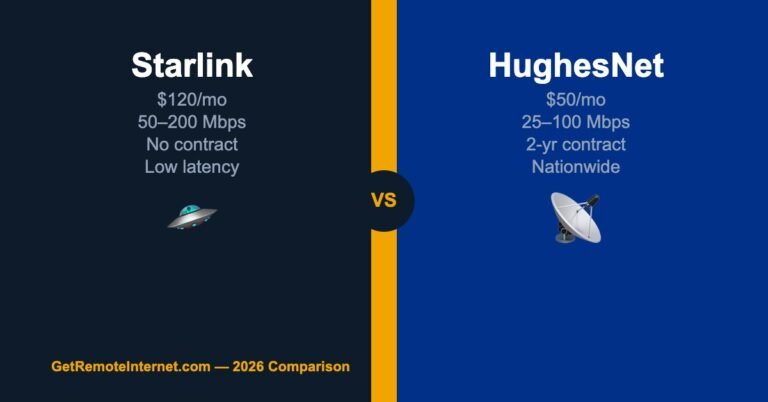
| Starlink Standard | $120/mo | 50–200 Mbps | $599 one-time |
| Starlink Priority | $250/mo | 40–220 Mbps priority | $599 one-time |
| Starlink Mobile | $150/mo | 5–50 Mbps | $599 one-time |
The Standard plan at $120/month is what most rural home users need. No data caps, no throttling, and no contract — you can cancel anytime.
Starlink Isn’t Available — What Are Your Best Alternatives?
If Starlink isn’t available at your address yet, don’t worry — you have solid options. Here are the best alternatives ranked for rural homes:
T-Mobile Home Internet — Best No-Contract Alternative
T-Mobile Home Internet costs $50/month with no contract, no data caps, and no equipment fees. If you have any T-Mobile LTE or 5G signal at your address, it’s worth checking availability before committing to satellite. Real-world speeds average 72–245 Mbps — competitive with Starlink and at less than half the price.
Viasat — Widest Satellite Coverage
Viasat covers virtually all of rural America through geostationary satellites. If T-Mobile doesn’t reach your property and you’re on Starlink’s waitlist, Viasat can bridge the gap now. Plans start at $70/month with professional installation included — no upfront hardware cost.
HughesNet — Most Affordable Nationwide
HughesNet is available almost everywhere in the US and starts at $50/month. Their newer Fusion plans blend satellite and cellular signals to dramatically reduce latency — making it a much better experience than older HughesNet plans. Great bridge option while you wait for Starlink.
For a full comparison of all your options, see our guide: Best Starlink Alternatives 2026.
How to Improve Your Chances of Getting Starlink Sooner
- Pay the $99 deposit now — it’s fully refundable if you cancel, and it locks your place in the queue ahead of future signups
- Check back every 30–60 days — availability changes as SpaceX launches new satellites and capacity expands
- Try a neighbor’s address — availability can differ by just a few hundred feet in hilly or wooded terrain
- Use the Starlink obstruction tool — download the Starlink app and use the sky scan tool to find the best install spot on your property before ordering
What “Waitlist” Really Means (and Whether to Pay the Deposit)
If your address shows a waitlist, that’s not a no — it means your area has coverage but capacity is full. The $99 deposit is fully refundable and holds your place in line ahead of everyone who signs up after you. My take: if you genuinely want Starlink, pay it. You lose nothing if you cancel, and waitlists have been clearing faster in 2026 as SpaceX keeps launching satellites.
The Obstruction Trap: “Available” Doesn’t Always Mean “It Works”
Here’s the mistake that burns people. The checker says “Available,” they order, they mount the dish wherever it’s convenient — and then it drops out every time a show gets good. Availability is about the satellite network reaching your area; it says nothing about the trees in your yard. Before you commit to a mount spot, open the Starlink app’s obstruction tool and scan the actual sky from that exact location. A single branch in the northern sky causes those maddening dropouts. Get the dish high and clear the first time and you’ll save yourself months of frustration.
If It Says “Not Available”: Your Next 3 Moves
- Check T-Mobile Home Internet. It reaches plenty of addresses Starlink doesn’t, it’s cheaper, and there’s no contract to try it.
- Register your email with Starlink and re-check yourself every 30-60 days. The coverage map changes constantly — don’t rely on them to notify you.
- Bridge the gap with Viasat or HughesNet. They cover essentially every address, so you’re not stuck offline while you wait — just mind the 2-year contract before you sign.
Frequently Asked Questions
How long is the Starlink waitlist?
It varies widely by location. In some rural areas it’s a few weeks; in others it can be several months. Since SpaceX has been aggressively expanding satellite coverage in 2025–2026, many waitlists are clearing faster than before. Paying the $99 deposit locks your spot and speeds up your position in line.
Is the Starlink availability checker accurate?
Yes — it checks your specific GPS coordinates against Starlink’s current service map. It’s updated regularly as coverage expands. If it shows “Not Available,” that reflects the real-time status for your exact location.
Can I get Starlink if I have trees blocking the sky?
Trees are one of the most common issues for rural Starlink users. Starlink needs a clear view of the northern sky (in North America) to work properly. Download the Starlink app and use the Obstruction Checker — it uses your phone’s camera to show exactly which trees or structures are in the way, and suggests the best mounting location on your property.
Does Starlink availability differ from address to address?
Yes, significantly. Two neighbors a quarter mile apart can get different results. Always check with your exact address, not just your zip code or city.
📡 Get Rural Internet Tips — Free
Provider updates, signal booster deals, and honest reviews delivered to your inbox.